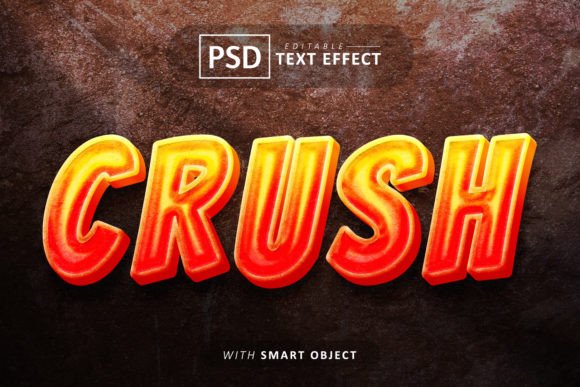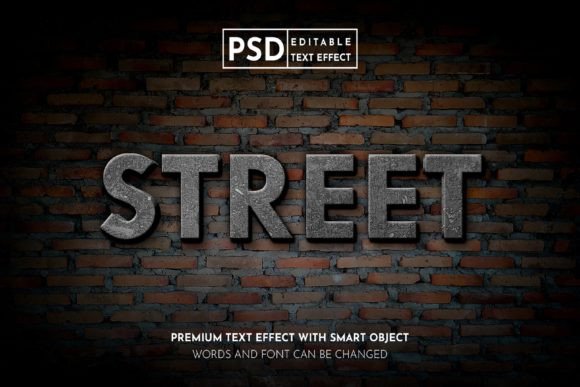
Street on Wall Realistic 3D Text Effect
The Street on Wall Realistic 3D Text Effect is a powerful Photoshop text effect designed for web designers, marketers, and content creators looking to add a dynamic, eye-catching visual element to their projects. This effect mimics the look of text that has been painted or applied directly onto a wall, giving it a realistic, three-dimensional appearance. Whether you're working on social media promotions, print materials, or digital publications, this text effect can elevate your designs with a professional and immersive feel.
This editable text effect is ideal for use in Instagram posts, Twitter banners, Facebook graphics, and other promotional content. It also works well for flyers, posters, magazines, event papers, and more. The RGB color mode ensures vibrant, accurate colors that look great on screens and in print.
Why Use This Text Effect?
The Street on Wall Realistic 3D Text Effect is more than just a visual tool—it's a workflow enhancer. It fits naturally into various stages of a design project, from initial concept to final delivery. For instance, during the planning phase, you can use it to visualize how text will appear in a real-world setting, helping you make informed design decisions. In the execution phase, it streamlines the process of adding text to your compositions without requiring advanced design skills.
For businesses and marketers, this text effect offers a quick way to create engaging visuals for campaigns. It allows you to experiment with different text styles, placements, and colors, ensuring your message stands out. For educators and bloggers, it provides an easy way to create visually appealing content that captures attention and conveys information effectively.
How to Use the Text Effect
Using the Street on Wall Realistic 3D Text Effect is straightforward, even for those new to Photoshop. The effect comes in a fully layered PSD file, making it easy to customize. To edit the text, simply double-click on the smart object layer. This action opens a new window where you can paste your desired text or design. Once you've made your changes, save the file, and the updated text will automatically reflect in the main composition.
This feature ensures that you don't have to start from scratch each time you want to change the text. It saves time and reduces the risk of errors, especially when working on multiple versions of a design. The smart object replacement function is particularly useful for teams collaborating on a project, as it allows multiple users to work on different elements without affecting the overall structure.
Key Features and Benefits
- Smart Object Replacement: Easily update text without disrupting the rest of the design.
- High Resolution: Ensure crisp, clear visuals that look great at any size.
- Easy to Use: No advanced Photoshop skills required—ideal for beginners and professionals alike.
- No Skill Requirement: Accessible to all users, regardless of experience level.
- Fully Layered and Organized: Layers are grouped and labeled for efficient editing and management.
These features contribute to a seamless workflow, allowing you to focus on creativity rather than technical challenges. The organized layer structure also makes it easier to navigate complex designs, ensuring consistency across your projects.
Integration with Other Tools and Workflows
The Street on Wall Realistic 3D Text Effect works well with other design tools and platforms. For example, if you're using Adobe Illustrator for vector graphics, you can export text elements and import them into Photoshop for the 3D wall effect. This integration supports a multi-tool approach, giving you more flexibility in your design process.
When working with clients or team members, the editable nature of this text effect simplifies feedback and revisions. You can quickly adjust text, colors, or layout based on input, ensuring that the final product meets expectations. This adaptability is especially valuable in fast-paced environments where time and efficiency matter.
Best Practices for Implementation
To get the most out of the Street on Wall Realistic 3D Text Effect, consider the following tips:
- Plan Your Design: Before applying the text effect, sketch out your layout and determine the placement of text elements. This helps avoid last-minute adjustments.
- Use Consistent Colors: Stick to a cohesive color scheme that aligns with your brand or project theme. The RGB color mode ensures accurate representation across devices.
- Test Different Styles: Experiment with font choices, sizes, and positions to find the best fit for your design. The editable nature of the effect allows for easy experimentation.
- Optimize for Different Platforms: Adjust the resolution and format based on where the design will be used—whether it's social media, print, or web.
By following these practices, you can ensure that your designs are not only visually appealing but also functional and adaptable to different contexts.
Long-Term Use and Maintenance
The Street on Wall Realistic 3D Text Effect is designed for long-term use, making it a valuable addition to your design toolkit. As your projects evolve, you can revisit and modify existing designs without starting over. This longevity reduces the need for repetitive work and helps maintain a consistent visual identity across your materials.
Maintaining a library of editable text effects like this one also improves efficiency. You can reuse and repurpose elements for future projects, saving time and resources. Additionally, keeping your files organized ensures that you can locate and access them quickly when needed.
Conclusion
The Street on Wall Realistic 3D Text Effect is a versatile and user-friendly tool that enhances the visual appeal of your designs. Whether you're creating social media content, marketing materials, or printed publications, this effect offers a practical solution for adding depth and realism to your text. Its editable and customizable nature makes it accessible to a wide range of users, from beginners to experienced designers.
By integrating this text effect into your workflow, you can streamline the design process, improve efficiency, and produce high-quality results. With its ease of use, compatibility with other tools, and long-term value, the Street on Wall Realistic 3D Text Effect is a must-have for anyone involved in digital or print design.